SOUND workspace
Music playback, automatic categories, volume levels, microphone control and catalogue editing. SOUND is locked while the main clock is running.
View screen
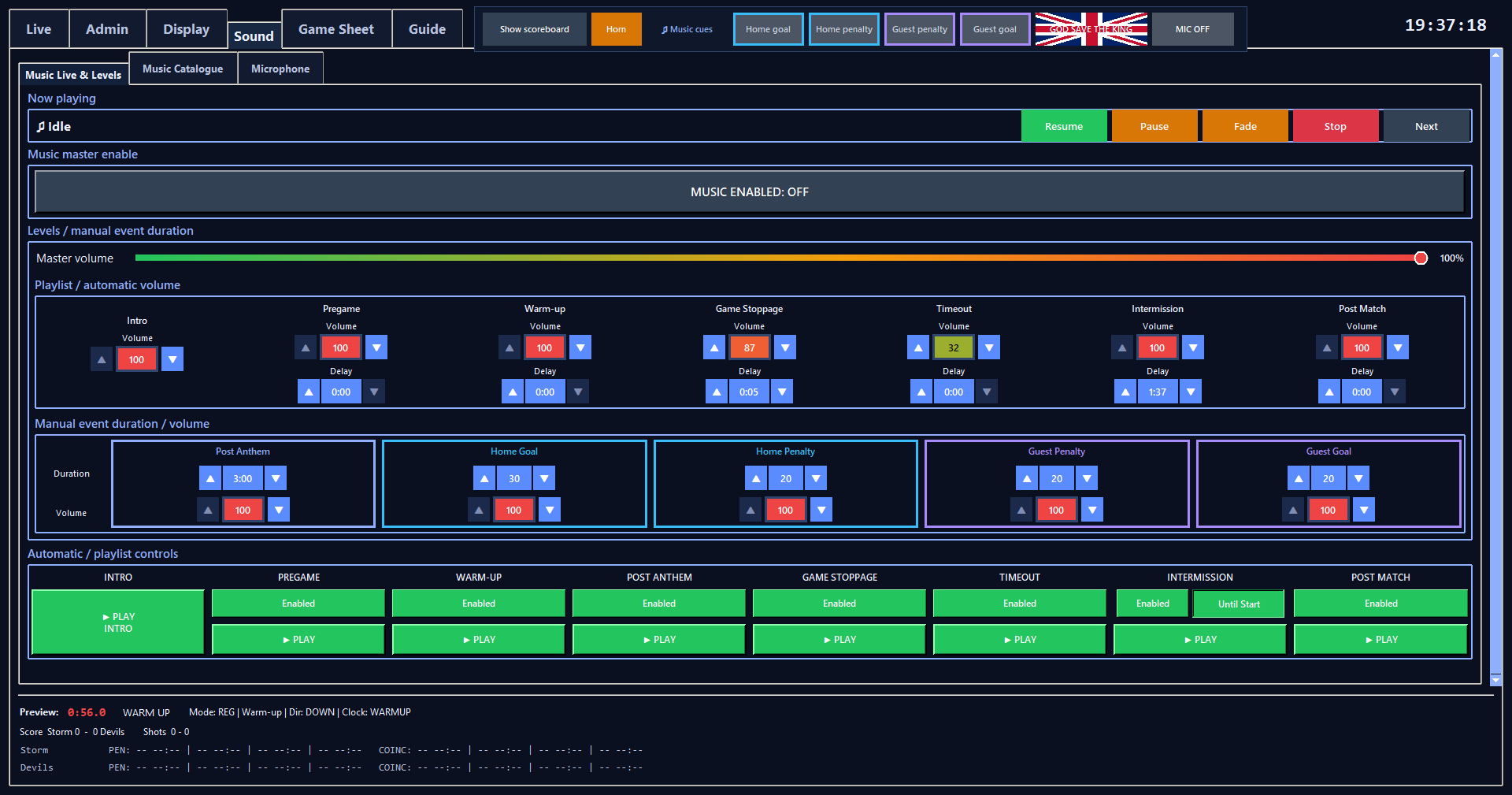
Music levels and match cues
Music playback, automatic categories, volume levels, microphone control and catalogue editing. SOUND is locked while the main clock is running.
Music playback, automatic categories, volume levels, microphone control and catalogue editing. SOUND is locked while the main clock is running.
Shows active song/category/playback state and provides transport controls.
Pauses whichever operator audio is currently active: normal music, the national anthem or the horn, without losing its playback position.
Resumes whichever operator audio is currently paused: normal music, the national anthem or the horn.
Stops current music with a 0.7-second operator fade.
Stops whichever operator audio is currently active: normal music, the national anthem or the horn. Anthem and horn state are cleared using the same unified handling as the LIVE transport.
Ends the current song and selects another song in the same category/mode when possible.
Global music on/off control.
Saved in scoreboard_music.json.
Manual playlist transport for the Intro category.
Green raised PLAY starts Intro; while active the same control is red/sunken STOP.
Allows or blocks automatic Pregame music when the scoreboard enters that context.
Green ENABLED means the automatic trigger is allowed; red DISABLED blocks only that automatic category.
Saved in scoreboard_music.json.
Allows or blocks automatic Warm-up music when the scoreboard enters that context.
Green ENABLED means the automatic trigger is allowed; red DISABLED blocks only that automatic category.
Saved in scoreboard_music.json.
Allows or blocks automatic Game Stoppage music when the scoreboard enters that context.
Green ENABLED means the automatic trigger is allowed; red DISABLED blocks only that automatic category.
Saved in scoreboard_music.json.
Allows or blocks automatic Timeout music when the scoreboard enters that context.
Green ENABLED means the automatic trigger is allowed; red DISABLED blocks only that automatic category.
Saved in scoreboard_music.json.
Allows or blocks automatic Intermission music for every intermission context, including the regulation P3 → OT intermission.
Saved in scoreboard_music.json.
Keeps automatic Intermission music playing after the intermission countdown reaches 00:00 until the next period actually starts.
Available only while Intermission Enabled is ON. If Intermission is disabled, Until Start is greyed out and cannot be pressed.
Saved in scoreboard_music.json. Disabling Intermission preserves the Until Start preference so it returns when Intermission is enabled again.
Allows or blocks automatic Post Match music when the scoreboard enters that context.
Green ENABLED means the automatic trigger is allowed; red DISABLED blocks only that automatic category.
Saved in scoreboard_music.json.
Allows or blocks only the follow-on songs assigned to Post Anthem; it never enables or disables the National Anthem itself.
Saved in scoreboard_music.json.
Manual transport under each playlist heading for Pregame, Warm-up, Post Anthem, Game Stoppage, Timeout, Intermission and Post Match.
MUSIC itself is locked while the main clock is running.
Sets an independent 0:00-99:00 quiet gap before Pregame, Warm-up, Game Stoppage, Timeout, Intermission or Post Match automatic music starts. Intro has no delay because it is an operator-triggered playlist.
Each category delay is saved in scoreboard_music.json. Existing Game Stoppage delay settings are migrated automatically.
Final global multiplier for every RinkScore sound: songs, National Anthem, Intro video audio, Advertising/intermission video audio and horn.
The settled value is saved in scoreboard_music.json rather than writing the file for every intermediate drag position.
Explains what each RinkScore music category is intended to do.
A finite follow-on playlist for music that should play only after the National Anthem.
Each eligible Post Anthem song can play at most once in a session. Preferred / Normal / Low weighting influences the order; it does not remove songs from the finite pool.
When the pool is exhausted, or the whole-playlist duration expires, RinkScore restores the interrupted valid music context when the sequence was automatic.
Enabled, whole-playlist duration and Post Anthem volume are saved in scoreboard_music.json. Duration is MM:SS up to 99:00; the anthem and fixed five-second gap do not consume it.
Independent 0-100% volume multiplier for Intro, Pregame, Warm-up, Game Stoppage, Timeout, Intermission and Post Match. Post Anthem volume is presented with its whole-playlist duration in Manual event duration / volume and is also the anthem volume control.
Automatic-start delays remain configurable for every normal automatic category except Intro; Post Anthem always uses its fixed 5-second anthem hand-off.
Volume and delay changes are saved to scoreboard_music.json.
Maximum play duration for Post Anthem plus Home Goal, Home Penalty, Guest Penalty and Guest Goal event music. Post Anthem uses MM:SS for the whole finite playlist; the four goal/penalty cues remain individual seconds-based events.
Saved in scoreboard_music.json.
Category multiplier for Post Anthem, Home Goal, Home Penalty, Guest Penalty and Guest Goal event music. Post Anthem volume also controls National Anthem output, while the Post Anthem Enabled toggle controls only its follow-on songs.
The resulting value is saved in scoreboard_music.json.
Adds supported audio files at the top of the catalogue.
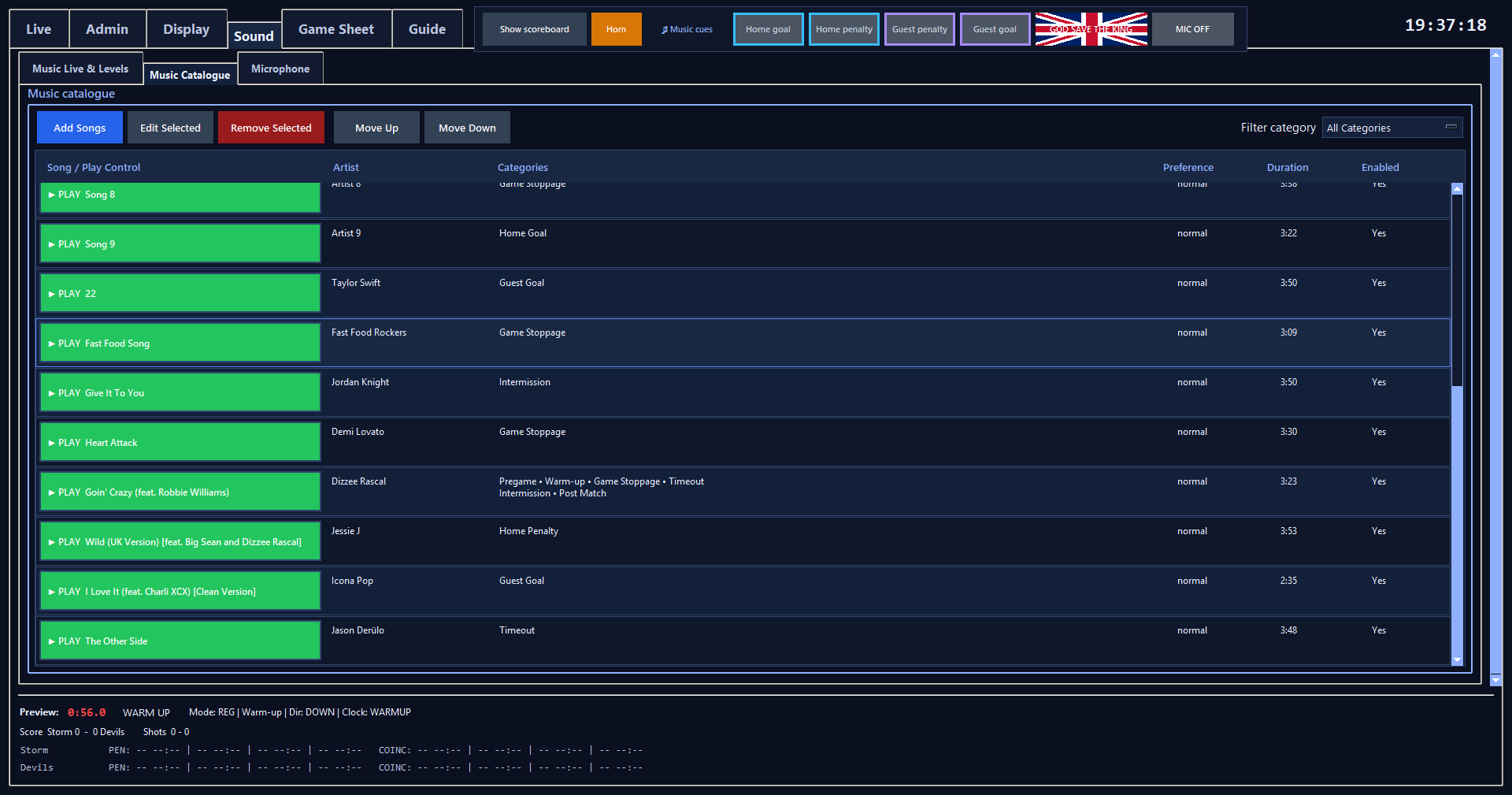
Opens the selected song's editor.
Select a catalogue row first.
Removes the selected catalogue entry and cleans it from recent-history lists. It does not delete the original source audio file.
Moves the selected song one visible position upward and saves the new catalogue order.
Select a song that is not already the first visible row.
Moves the selected song one visible position downward and saves the new catalogue order.
Select a song that is not already the last visible row.
Filters the visible catalogue without changing song assignments. All Categories shows everything.
None shows songs with no assigned category. Home shows songs assigned to Home Goal or Home Penalty.
Guest shows songs assigned to Guest Goal or Guest Penalty. The existing individual category filters remain available below these grouped filters.
Selects a catalogue song for editing, removal or direct PLAY/STOP.
Previews the selected song directly. Green PLAY starts it; active playback changes the button to red STOP.
Read-only path to the audio file used by the catalogue entry.
Editable display title used in Now Playing and the catalogue. Blank titles fall back to the file stem when saved.
Saved in scoreboard_music.json.
Optional artist text shown with the title.
Saved in scoreboard_music.json.
Assigns the song to any of the 12 music categories: Intro, Pregame, Warm-up, Post Anthem, Game Stoppage, Timeout, Intermission, Post Match, Home Goal, Home Penalty, Guest Penalty and Guest Goal.
Biases automatic random selection without making one song mandatory.
Saved in scoreboard_music.json.
Per-song 0-100% multiplier applied after Master and Category volume.
Saved in scoreboard_music.json when the song editor is saved.
Allows the song to participate in category selection. Disabled songs remain in the catalogue but are not eligible for automatic/category selection.
Sets where playback begins, useful for skipping a quiet intro.
Enter M:SS or seconds.
Optional hard playback end used to cut a quiet outro.
Leave blank for the natural end; otherwise enter M:SS or seconds.
Per-song fade-in duration in seconds.
Per-song fade-out duration in seconds. The controller begins fading when playback reaches end minus this duration.
Save normalises and stores song edits; Cancel closes the editor without applying current unsaved fields.
Selects the announcer microphone and turns RinkScore microphone automation on or off.
The selected device name is saved; microphone control itself starts safe/off when RinkScore launches.
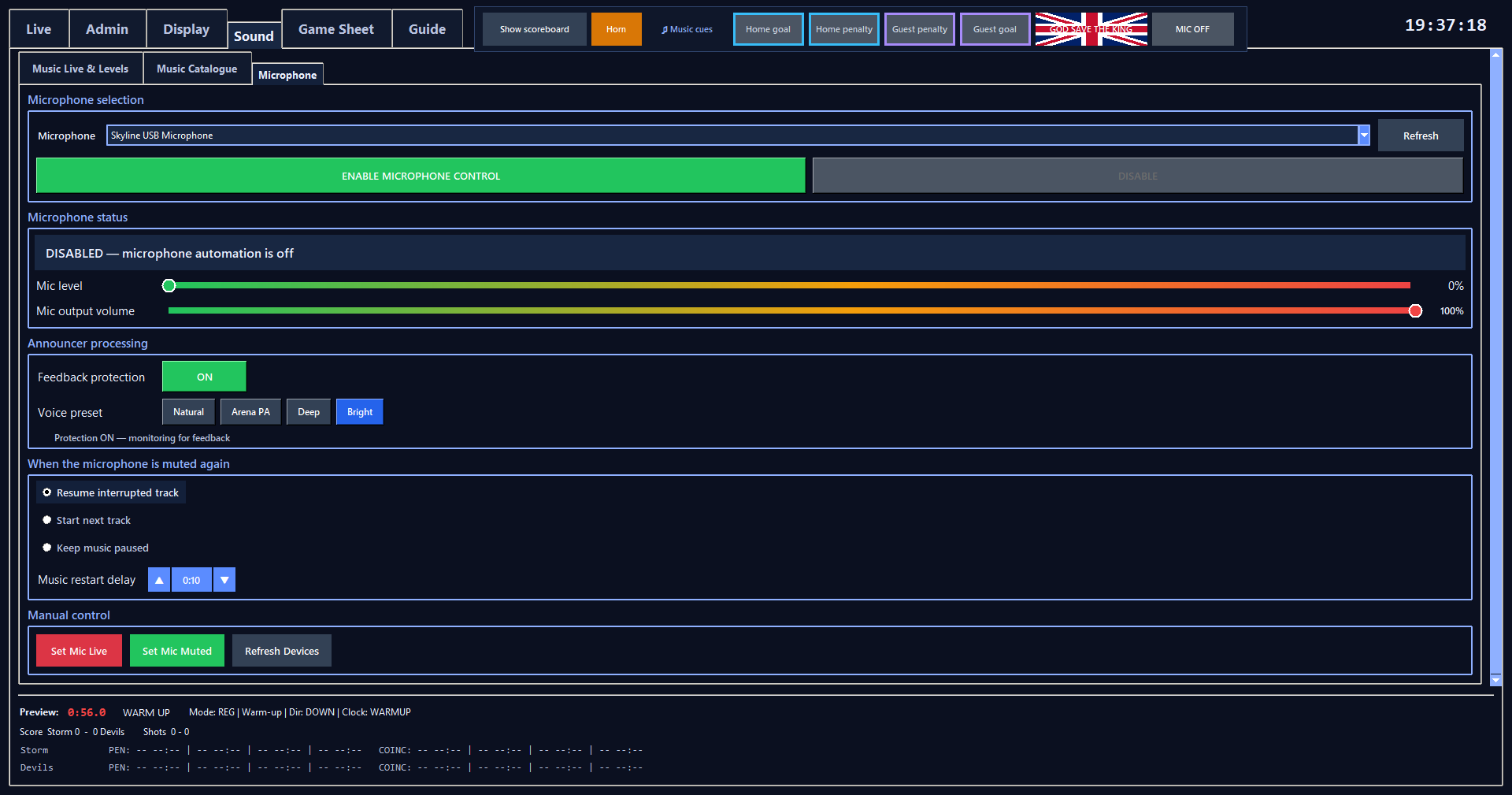
Shows the current microphone state and live input level.
When the microphone becomes live, RinkScore blocks/pauses music according to the microphone automation state.
Sets microphone-to-PA output independently from Music Master volume.
Drag the gradient control to set microphone output from 0–100%.
Saved in scoreboard_music.json.
Provides Feedback Protection plus Natural, Arena PA, Deep and Bright voice presets.
Feedback Protection and the selected preset are saved.
Chooses what music does when the microphone becomes muted again.
Resume mode and delay are saved.
Provides Set Mic Live and Set Mic Muted recovery controls plus Refresh Devices.
Use these controls for setup/testing or if a microphone does not expose its mute state reliably.
No topics match this search.